How To Handle Out-Of-Stock Shopify Product Pages Without Losing Catalog Clarity
Use a practical Shopify decision table for temporarily out-of-stock, seasonal, and discontinued product pages without losing catalog clarity.
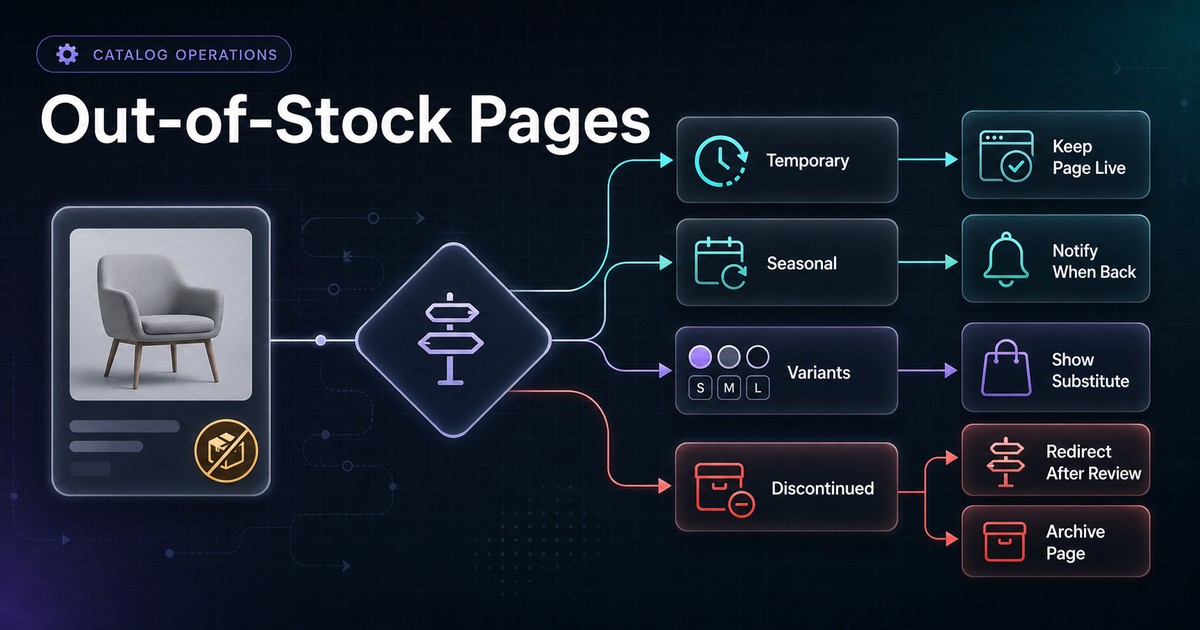
An out-of-stock Shopify product is not automatically a page that should be hidden, redirected, or deleted.
“Out of stock” can mean a variant will return tomorrow, a seasonal product will return next quarter, a preorder is open, or the product has been permanently discontinued. Those states require different customer messages and catalog actions.
The safest workflow starts with product intent and commercial truth, not a universal SEO rule.
The Short Version
Classify the item before changing the page:
| Product state | Typical page action | Availability message | Substitute path |
|---|---|---|---|
| Temporarily unavailable | Keep page active | Out of stock plus realistic restock guidance | Notify-me and close alternatives |
| Backorder allowed | Keep purchasable page active | Backorder status and expected fulfillment | Alternative only when useful |
| Seasonal and expected to return | Usually keep durable page | Seasonal return window if approved | Current-season alternatives |
| One variant unavailable | Keep product page; update variant state | Variant-specific availability | Select available variants |
| Discontinued with a close replacement | Consider a permanent redirect after review | Explain transition before redirect when needed | Closest true successor |
| Discontinued with useful ongoing information | Keep an informational page when it still serves users | Clearly discontinued | Current alternatives or support |
| Removed for legal, safety, or policy reasons | Follow legal and platform requirements | Case-specific | Case-specific |
| Page has no continuing value or substitute | Return an honest not-found or gone response after review | Not applicable | Useful category navigation |
These are decision patterns, not universal instructions. Validate customer demand, backlinks, support needs, replacement quality, market behavior, and legal obligations before changing a published URL.
Why “Out Of Stock” Is Not One State
Inventory quantity is only one input. Shopify availability can also depend on:
- Whether inventory is tracked.
- Whether the store continues selling when quantity reaches zero.
- Variant-level inventory.
- Fulfillment location and shipping-zone rules.
- Product publication by channel or market.
- Preorder or backorder applications.
- Bundles, subscriptions, or custom purchase logic.
A quantity of zero does not always mean “cannot be purchased,” and an active product does not always mean every customer can receive it.
Start with a plain-language business state:
Can a shopper purchase it now?
Will the same item return?
When is that expected?
Is there a true replacement?
Does the current page still help customers?
Then make storefront, structured-data, feed, search, and merchandising decisions agree with those answers.
Decision Table By Product State
Temporarily out of stock
Use this state when the same sellable item is expected back and the team has a credible replenishment process.
Recommended checks:
- Keep the stable product URL available.
- Disable purchase for unavailable variants unless backordering is intentional.
- State that the item is out of stock without inventing a return date.
- Offer notification signup only if the workflow is monitored and consent handling is appropriate.
- Show close alternatives without pretending they are identical.
- Keep price, specifications, compatibility, and support content accurate.
- Update page structured data and product submissions to reflect current availability.
Avoid “back soon” when nobody owns the purchase order or restock date.
Backorder or preorder
Use this state only when a shopper can place an order under a clear fulfillment promise.
Confirm:
- The add-to-cart and checkout flow actually accepts the order.
- Expected shipping timing is visible before purchase.
- Cancellation and payment treatment are understood.
- Shopify selling policy, storefront message, structured data, and product feed use compatible availability states.
- Customer support can answer order-status questions.
OutOfStock, BackOrder, PreOrder, and PreSale communicate different meanings in Schema.org availability vocabulary. Choose the value that matches the real offer, not the one that appears most favorable.
Seasonal and expected to return
A seasonal product may be unavailable for months while the page continues to answer durable questions.
Review:
- Whether the same model and specifications will return.
- Whether the URL has stable year-round demand.
- Whether old prices or dates could mislead shoppers.
- Whether current alternatives deserve prominent links.
- Whether the return period is approved and maintained.
If next season's product is materially different, it may deserve a new product record and URL rather than silently replacing the old item.
One variant is unavailable
Do not collapse a mixed-stock product into one parent-level message.
Check each variant's:
- Selector state.
- Price.
- Availability message.
- Add-to-cart behavior.
- Direct URL.
- Image.
- Structured-data Offer.
- Merchant Center item where variants are submitted separately.
An unavailable navy medium jacket should not make every jacket look unavailable, and an in-stock default variant should not make a sold-out variant look purchasable.
The product variant schema checklist explains how variant identity and offer data should remain aligned.
Permanently discontinued with a true replacement
A permanent redirect can be appropriate when the replacement genuinely satisfies the same user intent and the old page no longer needs to stand alone.
Before redirecting, compare:
- Product function.
- Audience.
- Compatibility.
- Price band.
- Specifications.
- Support implications.
- Market availability.
Google documents permanent redirects such as 301 and 308 as strong signals that the target should be processed. That does not make an unrelated category page a good replacement.
Do not redirect every retired product to the homepage or a broad collection. A redirect should help the user who requested the old URL.
Permanently discontinued but still useful
A discontinued page may continue to serve:
- Existing customers looking for specifications.
- Compatibility and replacement-part questions.
- Manuals, care, warranty, or safety information.
- Comparisons with a successor.
- Support teams handling historical orders.
If the page remains, make the state unmistakable:
- Label the product discontinued.
- Remove or disable purchase actions.
- Keep factual historical specifications.
- Link to a true replacement or current alternatives.
- Update structured data so it does not claim the item is in stock.
- Decide whether the page belongs in current collection navigation.
Keeping a useful page does not require presenting it as an active catalog item.
No continuing value or substitute
If a product will not return, has no meaningful support value, and has no true replacement, an honest 404 or 410 response may be appropriate after review.
Google states that URLs returning 4xx responses are not indexed and previously indexed URLs are removed over time. It treats most 4xx responses similarly for crawling purposes.
Preserve useful navigation on the site's not-found experience, but do not return a 200 response with a thin “product unavailable” error page that functions as a soft 404.
Keep Useful Product Information On The Page
When a page stays active, preserve the facts that help a shopper decide whether to wait or choose an alternative:
- Product name and model.
- Clear availability state.
- Variant-level availability.
- Price context when still accurate and useful.
- Images.
- Dimensions, materials, compatibility, and care information.
- Expected return timing only when approved.
- Notification option when operationally supported.
- Closest alternatives with the differences explained.
Avoid stripping the page down to one unavailable badge. The customer may still need to compare size, compatibility, or replacement options.
Use the product-page AI readiness audit to check whether the retained page still explains the product clearly.
Align Visible State, Structured Data, And Product Submissions
For every inventory-state change, compare four surfaces:
| Surface | What to verify |
|---|---|
| Shopify admin | Inventory tracking, quantity, selling policy, publication, variant state |
| Storefront | Message, selector, price, add-to-cart, alternatives |
| Structured data | Variant identity, offer URL, price, and availability |
| Merchant Center or other feeds | Submitted availability, price, destination, and refresh state |
Google supports availability values including InStock, OutOfStock, BackOrder, PreOrder, SoldOut, and Discontinued for Product offers. Use the most accurate value supported by the current guidance and implementation.
A structured-data update does not fix a storefront that still allows an impossible purchase. A feed update does not fix stale page copy. Trace all surfaces back to the same operational decision.
The schema-versus-feed guide provides a full source-ownership and mismatch workflow.
Shopify Search And Collection Behavior
An unavailable product can remain active while being less prominent in discovery.
Shopify Search & Discovery provides controls for unavailable products in search and predictive search, including showing them, hiding them, or placing them after available results. Shopify also documents approaches for hiding out-of-stock products from collections when inventory tracking and collection conditions support the intended rule.
Before hiding products broadly, test exceptions:
- Products allowed to oversell.
- Products with untracked inventory.
- Mixed-stock variants.
- Products stocked only at some locations.
- Markets or shipping zones with different fulfillability.
- Seasonal products that should remain discoverable.
Verify current behavior in Shopify's search result customization guidance and out-of-stock inventory guidance.
Alternatives Should Be Honest
A replacement block should explain why an item is a reasonable alternative.
Weak recommendation:
> This product is unavailable. Shop all products.
Stronger recommendation:
> Need the same 16-inch laptop fit? The Metro Pack 24L adds two liters of capacity and uses the same water-resistant shell, but it is 180 grams heavier.
Compare decision-critical facts:
- Compatibility.
- Size or capacity.
- Material.
- Main use case.
- Price band.
- Variant availability.
Do not call a higher-priced or incompatible item a replacement simply because it is in stock.
Operational Ownership Table
| Trigger | Owner | Action | Checkpoint |
|---|---|---|---|
| Variant reaches zero | Inventory operations | Confirm tracking and selling policy | Can the exact variant still be purchased? |
| Replenishment delayed | Merchandising | Update approved page message | Is the date credible and owned? |
| Seasonal range ends | Merchandising | Apply seasonal policy | Will the same item return? |
| Product discontinued | Product/catalog owner | Choose keep, redirect, or remove path | Is there support value or a true replacement? |
| Storefront state changes | Ecommerce owner | Review page, search, and collections | Are mixed-stock products handled correctly? |
| Schema or feed mismatch | Technical SEO/integration owner | Trace source and refresh | Do page and submitted item agree? |
| URL changes | SEO/engineering owner | Validate redirect or response | Does the destination serve the same intent? |
A workflow without named ownership will drift as inventory changes faster than editorial review.
Out-Of-Stock Product Workflow
- Step 1 — Identify the exact product and variant state.
- Step 2 — Confirm whether purchase is possible under current inventory and selling policy.
- Step 3 — Decide whether the same item will return.
- Step 4 — Record a credible return window or leave the date unstated.
- Step 5 — Select keep, backorder, seasonal, redirect, or remove behavior.
- Step 6 — Update shopper-facing messaging and purchase controls.
- Step 7 — Align structured data and product feeds.
- Step 8 — Review search, predictive search, and collection placement.
- Step 9 — Add honest alternatives or support links.
- Step 10 — Schedule a follow-up so temporary states do not become permanent by accident.
Catalog Audit Checklist
- Temporary, seasonal, backorder, and discontinued states have distinct definitions.
- Product and variant availability are not confused.
- Inventory tracking and continue-selling policy are verified.
- The storefront message matches actual checkout behavior.
- Any restock date has an owner and evidence.
- Structured-data availability matches the visible offer.
- Merchant Center or other product submissions are updated.
- Search and collection behavior is intentional.
- Alternatives satisfy the same important shopper need.
- Redirect targets are genuine replacements, not convenient destinations.
- Retained discontinued pages provide useful information.
- Removed pages return an honest HTTP response.
- Market, location, and fulfillment differences are tested where relevant.
- No indexing, ranking, traffic, or conversion outcome is guaranteed.
Where AnswerAtlas Fits
AnswerAtlas treats availability as a catalog-clarity signal. An audit can surface contradictions between product copy, variant state, structured data, and other product-data surfaces. The final keep, redirect, or removal decision still belongs to the merchant and should account for customer support, inventory policy, replacements, and technical SEO evidence.
Start with the ten unavailable products that receive the most customer or search demand. Classify each state, assign an owner, and make the storefront and data outputs agree before applying a store-wide rule.
Primary References
Next step
See how AI-readable your Shopify catalog is.
AnswerAtlas can scan product pages for AI-readiness signals such as structured data, catalog clarity, and crawler-friendly content.
Open Shopify App Store listing