Shopify AI Visibility Checklist For New Stores
Use this Shopify AI visibility checklist for new stores to cover product pages, collections, FAQ blocks, schema, and internal links before launch.
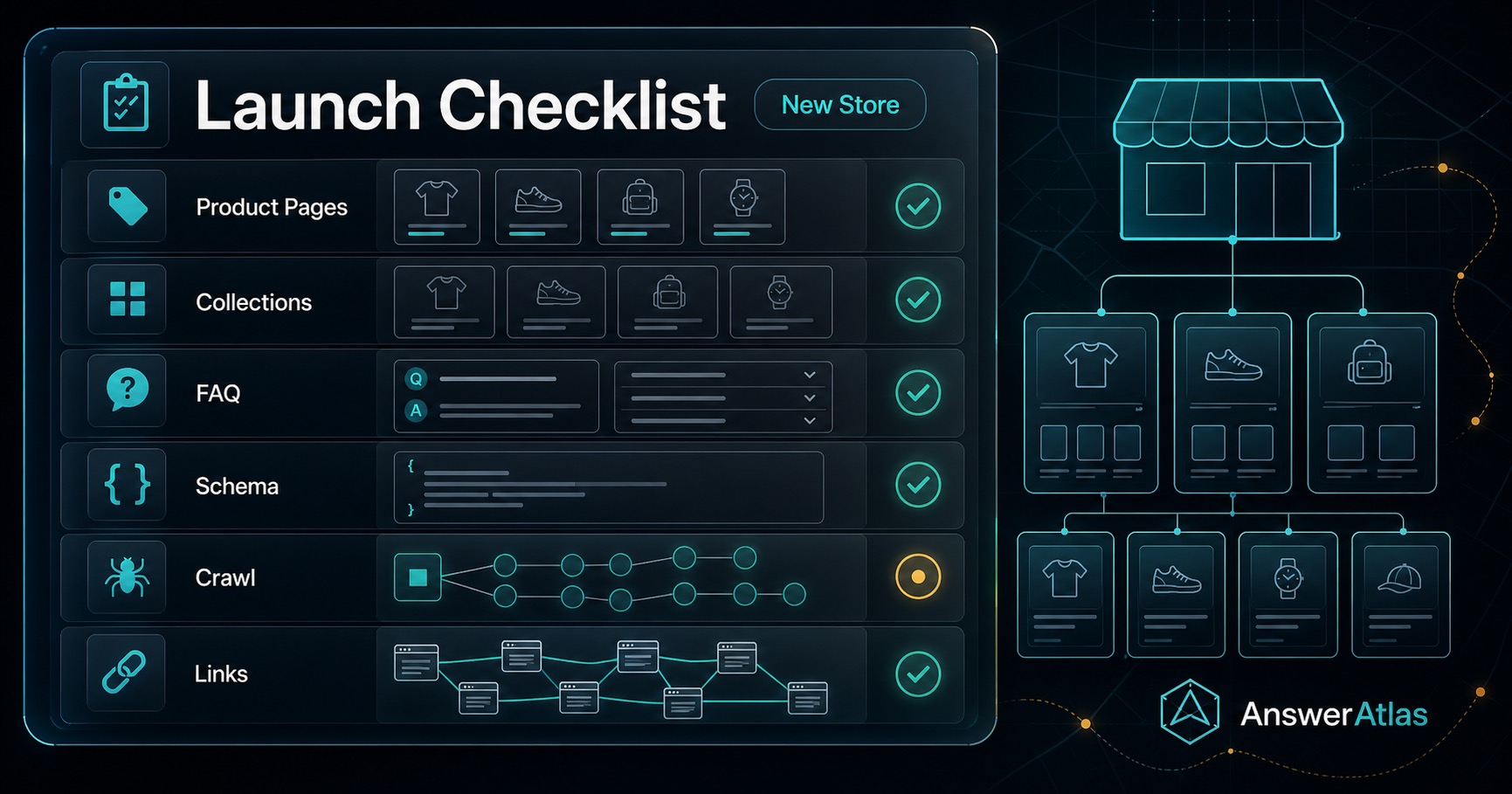
Launching a new Shopify store is usually a race between getting the storefront live and making sure the catalog is understandable. That is where AI visibility gets missed. Teams focus on design, payment, and launch logistics, then discover later that product pages, collection pages, and crawl surfaces were never really ready for search systems to read.
The goal is not to optimize for every possible AI system on day one. The goal is simpler: make sure your store explains what it sells, who it is for, and how the catalog is organized before traffic starts arriving.
This checklist is for founders, ecommerce operators, and agencies who want a practical launch order instead of a vague SEO lecture.
The Short Version
Before launch, make sure these five things are true:
1. Product pages explain the product in plain language. 2. Collection pages explain the category, not just the grid. 3. FAQ blocks answer real shopper questions. 4. Schema and visible copy say the same thing. 5. The store is crawlable, canonical, and linked together clearly.
If any of those are missing, fix them before you call the launch complete.
The Minimum Viable Order
Do not try to polish everything equally. Some pages matter earlier than others.
| Order | What to do | Why it matters |
|---|---|---|
| 1 | Write clear product pages for the launch assortment | Product pages are the core facts AI systems need to summarize. |
| 2 | Add collection page intro copy for the main categories | Collections explain how products relate to each other. |
| 3 | Add FAQ blocks to the highest-intent pages | FAQs reduce ambiguity before a shopper asks support. |
| 4 | Check Product schema and metadata | Structured data should reinforce the visible page, not contradict it. |
| 5 | Verify sitemap, canonical URLs, and robots rules | Launch pages need to be discoverable and not accidentally blocked. |
| 6 | Add internal links between products, collections, and guides | Links help shoppers and machines understand the catalog map. |
If you are short on time, do the top half of the table first. That is the minimum that keeps the store from feeling like a pile of isolated pages.
1. Product Pages: Explain The Offer Clearly
The first question for any launch product page is simple: can a shopper understand what it is without guessing?
Check these things
- The title says what the product actually is.
- The opening paragraph explains the use case.
- Important facts like size, material, fit, compatibility, or ingredients are visible.
- The page includes enough detail to distinguish the product from similar options.
- The copy does not rely on vague phrases like "premium quality" or "for everyday use."
Good launch pattern
- One sentence that says what the product is.
- One sentence that says who it is for.
- One short block that explains the main differentiator.
Weak launch pattern
- A stylish title.
- A short generic description.
- A product image.
- A buy button.
That may be enough to ship a storefront, but not enough to help AI systems or shoppers understand the product.
Simple example
Instead of:
Everyday Carry BackpackUse:
22L Commuter Backpack With Laptop SleeveInstead of:
Designed for everyday convenience.Use a sentence that names the use case, audience, and limitation:
This 22L commuter backpack is built for people who carry a laptop, water bottle, notebook, and small tech accessories in one bag. It is a better fit for office commutes than for overnight travel.That kind of copy gives AI systems and shoppers concrete facts to work with.
2. Collection Pages: Explain The Category
Many new stores treat collection pages like filtered product grids. That leaves a gap. A collection page should help a shopper understand the category and how to choose within it.
Check these things
- The collection title is clear.
- The intro copy explains the category.
- The page says what kind of shopper it is for.
- The page gives one or two decision criteria.
- The page links to relevant products or a buying guide.
What good looks like
A collection page for "Work Backpacks" should not only list products. It should briefly explain:
- Who the category is for.
- What size or capacity matters.
- Whether the use case is commuting, travel, or daily carry.
- Which related pages help shoppers decide.
That extra context helps AI systems understand the catalog structure instead of reading each product as a standalone page.
What to avoid
- A collection page with only a product grid.
- No text at all.
- Copy that repeats the same phrase on every collection.
- Category names that are too clever to be useful.
If a shopper cannot tell how the collection differs from another collection, AI systems usually cannot either.
3. FAQ Blocks: Answer Real Questions
FAQ blocks are most useful when they answer the questions that slow a purchase down.
Good questions for a new store
- What size should I choose?
- What is included?
- How do I care for this product?
- Is this compatible with X?
- When should I choose a different version?
- What is the return or shipping situation?
Weak FAQ patterns
- Questions that only repeat keywords.
- Answers that say "Yes, absolutely" without any detail.
- Fake questions that no shopper would actually ask.
Strong FAQ pattern
Question, answer, and one helpful detail.
Q: Will this backpack fit a 14-inch laptop?
A: Yes. The Large size includes a padded sleeve for most 14-inch laptops. If you only carry a tablet and a few daily essentials, the Medium size is lighter.
That answer helps the shopper decide and gives AI systems a useful summary.
4. Schema And Metadata: Match The Visible Page
Schema is not a shortcut around weak content. It is a machine-readable version of the same facts the page should already show.
Check these things
- Product name matches the page title or the visible naming system.
- Description in schema matches the visible copy.
- Price, currency, and availability are accurate.
- Image data is current.
- Variant logic does not conflict with the page.
Common launch mistake
The schema says one thing, the visible page says another, and the theme or app is left to reconcile the mismatch. That makes the page less trustworthy for both machines and shoppers.
Practical rule
If you update the product page, update the schema at the same time. If the launch version changes after the fact, recheck the metadata before you push more traffic at it.
5. Crawl Surfaces: Make The Store Discoverable
Launching a store without crawl hygiene is like printing a catalog and leaving it in a drawer.
Check these things
- Important pages are not accidentally blocked by
robots.txt. - The sitemap includes the live launch URLs.
- Canonical URLs point to the preferred pages.
- Draft or test pages are not exposed publicly.
- Redirects are clean and do not create chains.
- Core pages render their useful content without depending on hidden or broken UI states.
Why this matters
AI systems and search engines cannot reliably summarize pages they cannot access. If your launch pages are blocked, duplicated, or hard to resolve, the rest of the checklist loses value.
6. Internal Links: Show The Catalog Map
A new store can look disconnected if each page is isolated. Internal links help fix that.
Use links to connect
- Product pages to their parent collection.
- Collection pages to a relevant buying guide.
- FAQ blocks to policy or support pages.
- Comparison content to related products.
Good launch signal
The store should let a shopper move from product to category to explanation without feeling lost.
That also helps AI systems understand relationships across the catalog, which is especially useful when your launch assortment is small.
A Quick Pass/Fail Review
Use this before launch:
- Every launch product page explains what the product is.
- Every launch product page names the target shopper or use case.
- Main collection pages include useful intro copy.
- FAQ blocks answer actual purchase questions.
- Product schema matches visible content.
- The sitemap includes the live launch pages.
- Canonical URLs are correct.
- Draft or placeholder pages are not publicly accessible.
- Internal links connect products, collections, and support content.
If you miss more than two of these, do not treat the store as launch-ready yet.
What To Fix First
If the launch deadline is close, prioritize in this order:
1. Top-selling or most important launch products. 2. Main collection pages. 3. FAQ blocks for pages with the most questions. 4. Schema and metadata alignment. 5. Internal links and crawl surfaces.
The reason is simple: clarity at the page level matters more than a perfect site map. A small store with clear pages is better than a polished theme with vague content.
Launch Day Questions To Ask
Before you hit publish, ask these five questions:
1. If a shopper lands on the page cold, do they know what you sell? 2. If an AI system summarizes the page, does it have enough facts to do it accurately? 3. If two products are similar, can the catalog explain the difference? 4. If a buyer has a common objection, is it answered somewhere visible? 5. If the store is crawled today, will the important pages be discoverable and canonical?
What To Review After Launch
The checklist should not stop on launch day. Once the store is live, review the first pages that customers and crawlers are likely to see.
Start with:
- Products that receive the most paid or organic traffic.
- Collections that define the main catalog categories.
- Pages with support questions, returns questions, or sizing confusion.
- Any product that could be mistaken for a similar item.
Then compare what the page says with what a short AI-style summary would likely say. If the summary would be vague, incomplete, or wrong, the page needs more context.
Where AnswerAtlas Fits
AnswerAtlas helps Shopify teams turn this kind of launch checklist into a repeatable AI readiness review. Instead of guessing which pages are too thin, too disconnected, or too hard to summarize, teams can focus the audit on the product pages and collection pages that need clearer facts first.
The goal is not to promise that a new store will appear in every AI answer. The goal is to give AI systems and shoppers a cleaner catalog to understand from day one.
If you want the next step, start with your top 5 launch products, your main collection page, and one FAQ block. That small pass is enough to reveal whether the catalog is ready or still depends on guesswork.
If the answer to any of those is no, there is still launch work left.
Where AnswerAtlas Fits
AnswerAtlas helps Shopify teams run this kind of readiness check before launch traffic makes weak pages harder to ignore. The point is not to promise rankings or citations. The point is to find the pages that are too vague, too disconnected, or too inconsistent for AI systems and shoppers to understand quickly.
If you want a practical starting point, use this checklist on your first 5 to 10 products and your main collection pages. Then run the free AI readiness audit on the pages that need the most help.
Next step
See how AI-readable your Shopify catalog is.
AnswerAtlas can scan product pages for AI-readiness signals such as structured data, catalog clarity, and crawler-friendly content.
Open Shopify App Store listing