Shopify Product Schema Vs Merchant Center Feed: What Each Source Does
Compare Shopify product schema and Merchant Center feeds: what each source supports, where data mismatches arise, and how to review both.
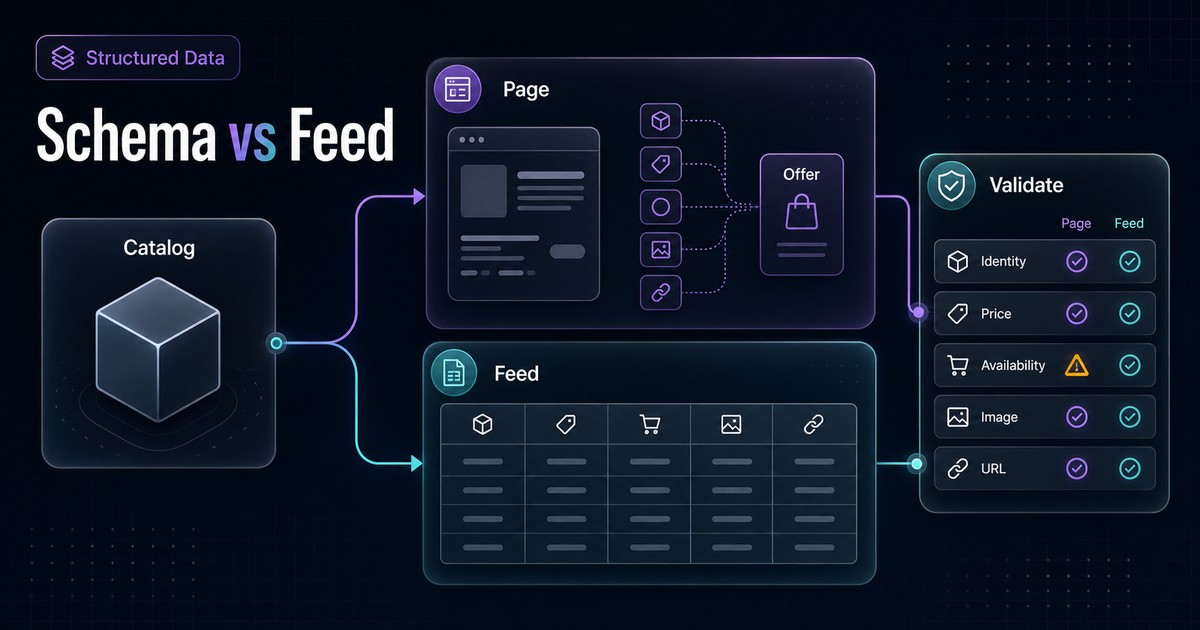
Shopify product schema and a Google Merchant Center feed describe overlapping product facts, but they are not interchangeable.
Product structured data describes what a specific product page says. A Merchant Center data source tells Google which products a merchant wants to submit and supplies commerce attributes through a managed channel. Both should trace back to the same Shopify catalog and storefront experience.
When the two disagree, adding more markup is rarely the first fix. The team needs to find which source is stale, which transformation changed the value, and what a shopper can actually buy on the landing page.
The Short Version
Use this three-layer model:
Shopify source catalog
  -> storefront page + Product structured data
-> Merchant Center data source- Shopify catalog: Owns products, variants, identifiers, inventory policy, prices, media, and merchandising data.
- Product structured data: Describes the product and offer represented on the page.
- Merchant Center data source: Submits and manages products for eligible Google surfaces, with feed-specific attributes and controls.
Google recommends using product structured data on pages and submitting product data through Merchant Center. Providing both can maximize eligibility and help Google understand and verify the information. It does not guarantee that a rich result, free listing, Shopping placement, or other experience will appear.
See Google's current Product structured data overview and product data sharing guidance before implementation.
The Three Product-Data Surfaces
1. Shopify source catalog
This is where the merchant manages the commercial object:
- Product and variant identity.
- Title and description.
- SKU, barcode, or other identifiers.
- Price and compare-at price.
- Inventory tracking and selling policy.
- Images.
- Product options.
- Metafields and category attributes.
- Market-specific availability or pricing where configured.
The source catalog is not automatically correct just because it is upstream. Duplicate SKUs, inconsistent options, stale metafields, and app-owned transformations can propagate into every downstream surface.
2. Product page and structured data
The storefront presents a shopper-visible product and purchase state. Product, ProductGroup, and Offer structured data make parts of that state machine-readable.
For a purchasable product page, Google merchant listing guidance supports details such as:
- Product identity.
- Variant relationships.
- Price and currency.
- Availability.
- Condition.
- Shipping and return information where applicable.
The markup must match the visible page and selected product or variant. Passing a syntax test does not prove that the price, availability, identifier, or URL is commercially correct.
Start with the Shopify Product schema checklist. For variant families, use the product variant schema review.
3. Merchant Center data source
Merchant Center can receive product data through uploaded or scheduled files, platform connections, APIs, spreadsheets, and automated website discovery, depending on the account and setup.
This channel provides:
- Explicit product submission and management.
- Feed-specific attributes and diagnostics.
- More control over update timing than waiting for ordinary web crawling.
- Participation in surfaces that require Merchant Center, including the Google Shopping tab under Google's current rules.
- Attributes that may not need to appear directly on the landing page.
Google notes that web crawling is not guaranteed to find every product and that Merchant Center feeds can provide greater update control for larger or frequently changing catalogs.
Responsibility Matrix
| Product fact or task | Shopify catalog | Page and schema | Merchant Center | QA question |
|---|---|---|---|---|
| Product title | Primary merchant source | Must match visible page context | Submitted title may follow channel rules | Are differences intentional and supportable? |
| Product URL | Product handle and routing | Canonical and offer URL describe page state | link sends users to the landing page | Does the URL open the submitted product or variant? |
| Product identity | Variant ID, SKU, barcode | sku, gtin, group relationships | id, GTIN, MPN, brand as applicable | Do identifiers refer to the same commercial item? |
| Price | Shopify pricing and market logic | Visible price and Offer.price | Submitted price | Do currency, taxes, market, and sale state agree? |
| Availability | Inventory plus selling policy | Visible state and Offer.availability | Submitted availability | Can the item actually be purchased from the landing page? |
| Image | Product or variant media | Visible and structured-data image | Submitted image link | Does it represent the same item and variant? |
| Shipping | Shopify and fulfillment configuration | Visible policy or structured data where implemented | Shipping settings or attributes | Are country, service, and cost rules aligned? |
| Returns | Merchant policy | Visible policy and organization/offer markup where implemented | Merchant Center return policy | Is one approved policy represented consistently? |
| Destination control | Product publication and storefront access | Crawl and index controls | Feed destinations and account controls | Is the product intentionally eligible for each channel? |
| Diagnostics | Catalog QA and app logs | Rich Results Test and Search Console | Merchant Center diagnostics | Which system first reports the mismatch? |
The table shows overlap, not duplication. Each surface has a distinct job and validation method.
What Product Structured Data Does
Structured data helps Google understand the entities and commerce facts on a page. Depending on the markup and page type, it can support eligibility for product snippets or merchant listing experiences in Google Search.
It is especially useful for verifying that the page exposes:
- The correct product or variant identity.
- The offer shown to the shopper.
- Current price, currency, and availability.
- The relationship between a product family and its variants.
- Relevant merchant policy details where implemented.
Structured data is tied to a URL and its content. It does not provide the same inventory of submitted products, destination controls, feed rules, or account diagnostics as Merchant Center.
Google also warns that JavaScript-generated Product markup can be less reliable for fast-changing price and availability. Inspect initial HTML as well as the rendered page.
What A Merchant Center Data Source Does
A Merchant Center data source is a managed commerce submission. It can tell Google directly which products to process and can update on a planned schedule or through an integration.
Compared with ordinary crawling, it can offer:
- More complete product submission.
- Scheduled or immediate updates, depending on the method.
- Detailed attribute-level diagnostics.
- Country, language, destination, and program controls.
- Additional commerce data not necessarily displayed in the same form on the page.
Merchant Center can also automatically find products by crawling a verified store and extracting structured data. Google describes this as an automated data source, not evidence that feeds and schema have become the same thing. The resulting products are still managed in Merchant Center, and merchants still need to review diagnostics, policies, and unwanted submissions.
Why Google Recommends Both
Google states that providing both page-level structured data and a Merchant Center feed can maximize eligibility and help it correctly understand and verify product data.
The two channels reinforce different confidence signals:
- The page shows what a shopper sees and can purchase.
- Structured data describes that page state explicitly.
- Merchant Center provides a managed product submission and channel-specific attributes.
Some Google experiences may combine information from both sources. Merchant Center data may contribute pricing information to product snippets, while structured data can assist feed verification. That is another reason the values must agree.
“Use both” does not mean “maintain both manually.” A Shopify integration may generate each output from the catalog. The team still needs to identify the owner and transformation path for every critical field.
Common Mismatch Patterns
Price differs
Possible causes:
- The feed refreshed before or after a storefront price change.
- The page uses a market-specific currency but the feed targets another country.
- Sale dates or compare-at logic are transformed differently.
- Structured data emits a default variant while the feed submits another variant.
- A subscription or bundle app changes the visible offer.
Check the directly purchasable landing-page state first, then trace the page markup and submitted item.
Availability differs
Possible causes:
- Inventory changed after the last feed update.
- Shopify permits overselling when quantity reaches zero.
- Inventory is not tracked for the variant.
- Location or fulfillment rules change what the shopper can buy.
- The page emits parent-level availability for mixed-stock variants.
Google identifies price and stock update lag as common sources of inconsistency. Automatic item updates can help reconcile some supported attributes from website data, but Google says they are not a replacement for regular product-data updates.
Identifier differs
Possible causes:
- Parent SKU is reused for variants.
- A barcode changed in Shopify but not in a supplemental source.
- An app invents or transforms IDs differently.
- The feed groups variants under one item while page schema describes separate items.
Do not fix identity mismatches with cosmetic title changes. Decide which Shopify product or variant each record represents.
URL opens the wrong item
Possible causes:
- Feed link drops the Shopify variant query parameter.
- Canonical handling and direct variant URLs are confused.
- Market or language redirects change the destination.
- The submitted product is unpublished in the target market.
Open the exact Merchant Center link in a clean browser session and confirm product, variant, price, currency, availability, and add-to-cart state.
Image differs
Possible causes:
- Variant image is not mapped.
- The feed retains a cached image URL.
- The page schema points to a parent image.
- An image was replaced without a stable update process.
A technically accessible image can still represent the wrong color or variant.
Mismatch Diagnosis Matrix
| Symptom | First check | Then inspect | Avoid |
|---|---|---|---|
| Price mismatch | Exact landing-page price and currency | Shopify market price, schema Offer, feed item timestamp | Editing schema without checking source price |
| Availability mismatch | Can the exact variant be purchased? | Inventory policy, locations, page Offer, feed refresh | Treating quantity zero as the only availability rule |
| Wrong variant | Submitted URL state | Variant ID, SKU/GTIN, ProductGroup mapping | Using parent data for every variant |
| Missing product | Shopify publication and crawlability | Integration scope, feed rules, Merchant Center diagnostics | Assuming Google crawled every product |
| Duplicate item | Merchant Center item IDs | Variant grouping and multiple data sources | Deleting records before identifying ownership |
| Policy mismatch | Visible shipping/return terms | Shopify settings, page markup, Merchant Center settings | Publishing contradictory policies |
| Rich result absent | Search Console and valid page markup | Eligibility, indexing, content quality | Assuming valid schema guarantees display |
A Safe Review Sequence
Step 1: Select one exact variant
Record:
- Shopify product and variant IDs.
- SKU and GTIN when valid.
- Landing-page URL.
- Target country and language.
- Expected price, currency, and availability.
A broad product-family review can hide variant-level errors.
Step 2: Verify the shopper experience
Open the direct URL and confirm:
- Correct variant selected.
- Correct title and image.
- Correct price and currency.
- Accurate availability message.
- Successful add-to-cart behavior when available.
- Visible shipping or return claims do not conflict with policy.
Step 3: Inspect page structured data
Compare the visible page with:
ProductorProductGroupidentity.- SKU or GTIN.
- Offer URL.
- Price and currency.
- Availability.
- Variant relationships.
Use the Rich Results Test for parse and eligibility feedback, then use Search Console URL Inspection to review Google's fetched version. A passing test is one checkpoint, not final proof.
Step 4: Inspect the Merchant Center item
Review:
- Data source and last update.
- Item ID and identifiers.
- Link and image link.
- Price and availability.
- Target country, language, and destinations.
- Attribute warnings, disapprovals, and account-level issues.
Step 5: Trace the transformation
Map the path:
Shopify field
  -> theme/app/integration mapping
    -> page or feed output
      -> Google processing
Record which system owns the correction. A theme developer should not patch a feed-only mapping problem, and a feed rule should not conceal inaccurate visible content.
Step 6: Recheck after processing
Update timing differs by integration and Google system. Record the change timestamp, refresh action, and review window rather than promising immediate results.
Source-Ownership Worksheet
| Field | Shopify source | Page output owner | Merchant Center owner | Refresh method | Escalation owner |
|---|---|---|---|---|---|
| SKU | Variant SKU | Theme or schema app | Shopify/Google integration | Catalog sync | Ecommerce operations |
| Price | Market-aware variant price | Theme and schema output | Integration | Scheduled or API sync | Merchandising |
| Availability | Inventory and selling policy | Theme and schema output | Integration | Inventory sync | Operations |
| GTIN | Variant barcode | Theme or app | Integration | Catalog sync | Catalog manager |
| Product URL | Product/variant route | Theme | Integration mapping | Feed refresh | Technical SEO |
Complete this table for the actual store. Do not assume the default Shopify integration, theme, or app owns every value.
Structured Data And Feed QA Checklist
- One exact product variant and target market are selected for testing.
- Shopify product, variant, SKU, and GTIN identities are mapped.
- The submitted URL opens the correct purchasable state.
- Visible price, currency, and availability are accurate.
- Page structured data matches the visible state.
- Merchant Center values match the intended landing page.
- Data source and last-update timestamps are recorded.
- Theme, app, integration, and supplemental-feed ownership is documented.
- Shipping and return information does not conflict.
- Rich Results Test, URL Inspection, and Merchant Center diagnostics are reviewed for their distinct jobs.
- Automated updates are not treated as a substitute for regular synchronization.
- No rich-result, Shopping, traffic, or revenue outcome is guaranteed.
Where AnswerAtlas Fits
AnswerAtlas frames schema and feed checks as catalog-consistency work. The important question is not whether both channels exist. It is whether product identity, visible content, structured data, and submitted commerce data describe the same item.
A structured-data audit can identify page-level gaps and contradictions. It cannot prove that every Merchant Center item, market rule, inventory integration, or account policy is healthy without reviewing those systems directly.
Start with one high-value variant that changes price or availability often. Trace it from Shopify to the landing page, structured data, and Merchant Center. Once the ownership path is clear, repeat the process across the catalog.
Primary References
Next step
See how AI-readable your Shopify catalog is.
AnswerAtlas can scan product pages for AI-readiness signals such as structured data, catalog clarity, and crawler-friendly content.
Open Shopify App Store listing