Shopify Product Metafields: Which Catalog Attributes Improve Product Clarity
Learn which Shopify product metafields can make catalog attributes more consistent, useful to shoppers, and easier to maintain.
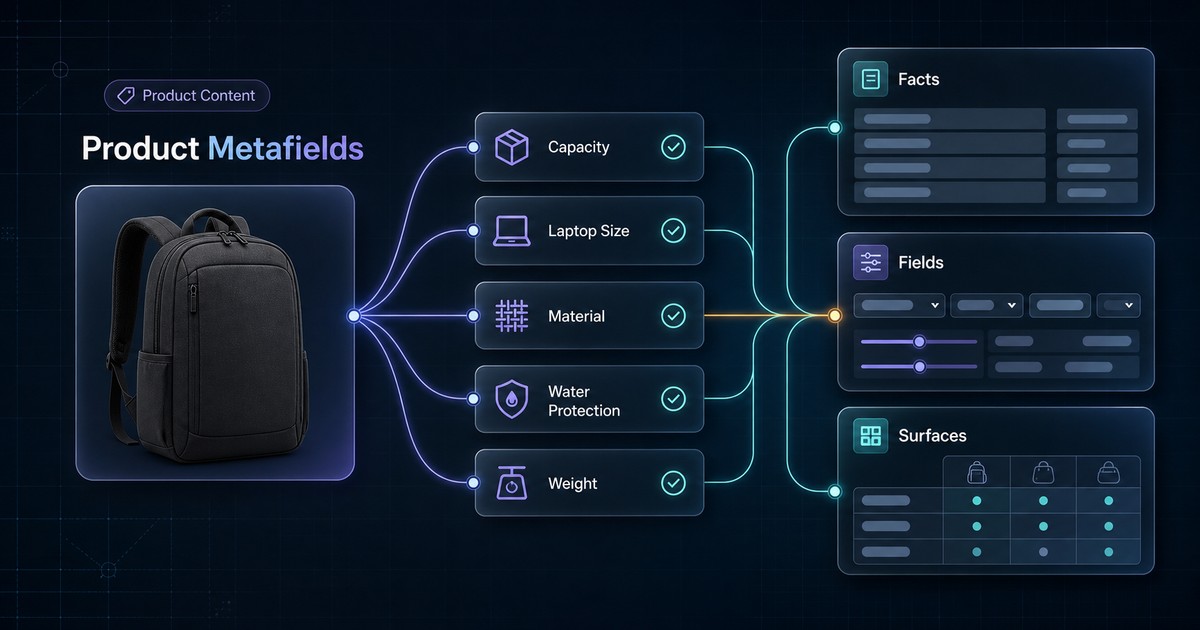
Shopify product metafields are useful when a product fact needs a clear definition, a predictable value, and more than one destination. They are less useful when a team creates fields simply because a fact could be structured.
The practical question is not “How many metafields should this product have?” It is:
Which facts must stay consistent across product pages, filters, comparisons, operations, and future catalog updates?
This guide provides a decision framework, a concrete backpack attribute model, and rules for deciding when prose, options, taxonomy attributes, or metafields are the better source.
The Short Version
Create a metafield when all or most of these conditions are true:
- The fact has a stable definition.
- The fact applies to many products of the same type.
- The value can be validated or selected from a controlled set.
- Shoppers use the fact to compare or qualify products.
- More than one storefront or operational surface needs the value.
- Someone owns the field and its allowed values.
Do not create a metafield just to store campaign copy, duplicate a variant option, or capture a one-off detail that belongs naturally in the product description.
Shopify metafield definitions can specify the resource, data type, validations, and access behavior for a field. Standard definitions and category metafields can provide shared semantics where they fit; custom definitions are appropriate when the merchant has a legitimate store-specific fact. Review Shopify's current metafield definition guidance before implementation.
Start With The Product Fact, Not The Field
A field name such as features or details is not an attribute model. It does not tell a writer what belongs there, which values are valid, or where the information should appear.
Define each proposed attribute with this contract:
| Question | Example answer |
|---|---|
| Shopper question | Will this backpack fit my laptop? |
| Attribute | Maximum supported laptop size |
| Definition | Largest supported closed-device diagonal |
| Resource level | Product |
| Data type | Number with a documented unit |
| Allowed values | 13, 14, 15, 16, 17 inches |
| Required for | Laptop backpacks |
| Visible location | Specifications and comparison table |
| Other consumers | Collection filter, merchandising export |
| Owner | Merchandising |
The contract matters more than the namespace or key. Without it, custom.laptop_size can still collect values such as MacBook, large, up to 16, and 16 inch, which are difficult to compare reliably.
If core facts are currently buried in inconsistent copy, first use the product content gaps workflow to identify what is missing. Metafields should preserve a good content model, not disguise a weak one.
Choose The Right Shopify Data Surface
Not every product fact belongs in a product metafield.
| Surface | Best fit | Example | Common mistake |
|---|---|---|---|
| Product description | Explanation, context, benefits, caveats | Why a fabric works for humid travel | Turning every sentence into a field |
| Product option | A choice that creates a purchasable variant | Size or color | Duplicating the option in a product metafield |
| Product metafield | A stable fact shared by all variants | Capacity or care instructions | Storing a fact that changes by variant |
| Variant metafield | A fact tied to one sellable variant | Variant-specific swatch or measurement | Treating mixed inventory as one product-level value |
| Category metafield | A taxonomy-related attribute for a product category | Apparel fabric or neckline | Using a custom field when a suitable category attribute exists |
| Tag | A small operational or grouping label | Internal campaign grouping | Using free-form tags as the canonical specification database |
| Product type or category | Durable classification | Backpacks | Packing multiple attributes into classification labels |
Shopify category metafields are connected to product categories in Shopify's Standard Product Taxonomy and can expose category-relevant attributes. Use them when the definition matches the product fact. Use a custom definition when the business needs a distinct attribute that the standard model does not represent accurately.
Do not choose a standard field merely because it is available. A technically reusable definition is still wrong if its meaning does not match the catalog.
Product-Level Or Variant-Level?
Ask one question:
Can this value change between two purchasable variants of the same product?
If yes, the fact usually belongs at variant level or in the product option itself.
| Attribute | Likely location | Reason |
|---|---|---|
| Backpack capacity | Product | Every color of one model usually has the same capacity |
| Color | Product option or variant attribute | The shopper purchases a specific color |
| Variant inventory | Variant | Availability can differ by sellable item |
| Waterproof rating | Product | Construction is shared across variants |
| Material | Product or variant | Depends on whether material is a purchasable choice |
| Laptop compatibility | Product or variant | Depends on whether dimensions change by option |
A product-level value should not summarize conflicting variants. If one jacket variant is wool and another is cotton, material: wool, cotton at the parent level may be too vague for filtering or comparison. Model the purchasable choices instead.
This distinction also affects storefront filters. The Shopify Search & Discovery product-data guide explains why a variant-level filter source is often more faithful when a shopper expects the matching variant to be selected.
A Concrete Attribute Model: Commuter Backpacks
Consider a store with twelve commuter backpacks. Product descriptions mention capacity, laptop fit, shell material, water protection, dimensions, and weight, but the wording varies by writer.
A useful first model could look like this:
| Fact | Proposed source | Type or vocabulary | Storefront use |
|---|---|---|---|
| Product category | Shopify product category | Standard taxonomy selection | Classification and relevant category attributes |
| Capacity | Product metafield | Number in liters | Specification and comparison |
| Maximum laptop size | Product metafield | Controlled number in inches | Specification and filter |
| Exterior material | Category or product metafield | Controlled value list | Specification and filter |
| Water protection | Product metafield | Controlled values: none, resistant, waterproof | Product copy and comparison |
| Product weight | Product metafield | Weight type | Specification |
| Dimensions | Product metafield or supported dimension model | Documented order and unit | Product page |
| Color | Product option | Controlled option values | Variant selection |
| Color family | Variant/category attribute when supported | Controlled value list | Filter grouping |
| Marketing story | Product description | Editorial prose | Product explanation |
The model intentionally leaves some information in prose. “Designed for a crowded train commute” is useful copy, but it is not necessarily a reusable catalog attribute.
Example values
Weak entries:
capacity: 22 litre / 22L / Medium
laptop fit: MacBook-friendly / laptop-ready / up to 16 inch
waterproof: yes / weatherproof / rain ready
Controlled entries:
capacity_liters: 22
max_laptop_size_inches: 16
water_protection: water_resistant
The visible product page can translate those values into natural language:
> Holds 22 liters and fits most laptops up to 16 inches. The shell is water-resistant for light rain but is not designed for submersion.
Structured facts and good prose should confirm each other.
Decide Which Attributes Deserve Fields
Score each candidate from zero to two on five questions:
| Criterion | 0 | 1 | 2 |
|---|---|---|---|
| Reuse | One page only | Occasional reuse | Multiple reliable consumers |
| Comparability | Subjective | Partly comparable | Direct shopper comparison |
| Stability | Changes often | Changes sometimes | Stable product fact |
| Validation | Free-form only | Some rules possible | Clear type or controlled values |
| Coverage | Few products | One meaningful subset | Most products in the type |
A high score does not automatically require a metafield, but it justifies design work. A low score usually means the fact belongs in prose, an internal note, or nowhere.
Good candidates
- Capacity.
- Product weight.
- Compatible device size.
- Material composition.
- Care instructions.
- Warranty duration.
- Certifications with a defined issuer and scope.
Weak candidates
- “Best seller.”
- Seasonal campaign slogans.
- Long benefit paragraphs.
- Duplicate title or description text.
- A yes/no field whose meaning nobody has defined.
- A specification that applies to only one product and has no reuse case.
Use Definitions And Validation Deliberately
A Shopify metafield definition gives a field a name, namespace and key, resource, type, and optional validation rules. That makes the field safer than an undocumented free-form value, but only if the selected type matches the fact.
Examples:
- Use a number or measurement type for quantities instead of embedding units in text.
- Use a boolean only when “true” and “false” have an unambiguous business meaning.
- Use controlled references or lists when the team needs a reusable vocabulary.
- Use a date type for a genuine date, not a vague season label.
- Document whether an empty value means unknown, not applicable, or incomplete.
Shopify's supported types, validations, taxonomy fields, and storefront capabilities can change. Confirm the current behavior in the Shopify metafield documentation and test the exact theme, app, API version, and Search & Discovery configuration that will consume the field.
Separate Source Values From Display Copy
A normalized value does not have to become awkward storefront language.
For example:
source value: water_resistant
filter label: Water resistant
specification: Water protection: Water resistant
product copy: Handles light rain; not designed for submersion.
The source value supports consistency. The display layer supports comprehension.
Do not let every channel invent its own interpretation. If the product page says “waterproof” while the controlled value says water_resistant, the catalog has a trust problem, not a formatting problem.
The product description guide provides a structure for turning product facts into useful shopper-facing explanation.
Build Governance Before Bulk Entry
For every new definition, record:
- Business definition.
- Eligible product types.
- Product or variant level.
- Data type and unit.
- Allowed values.
- Empty-value meaning.
- Visible destinations.
- Apps, feeds, or exports that consume it.
- Owner.
- Change process.
Then test the definition on three product cases:
1. A straightforward product. 2. A product with unusual or missing information. 3. A product with variants that challenge the chosen level.
If the model cannot describe all three without exceptions, revise it before a bulk import.
Catalog Rollout Workflow
- Step 1 — Pick one product type, not the whole store.
- Step 2 — List shopper questions and current data gaps.
- Step 3 — Check product options, Shopify taxonomy, and existing definitions before creating custom fields.
- Step 4 — Write the attribute contract and exclusion rule.
- Step 5 — Test the model on three difficult products.
- Step 6 — Normalize values and units.
- Step 7 — Render important facts visibly on the product page.
- Step 8 — Connect only the approved consumers, such as filters or comparison blocks.
- Step 9 — Measure missing, invalid, and conflicting values.
- Step 10 — Assign an owner and review after theme, app, taxonomy, or catalog migrations.
Product Metafield Audit Checklist
- Every field answers a named shopper or operational question.
- A suitable product option, taxonomy attribute, or existing definition was checked first.
- Product-level and variant-level facts are separated correctly.
- The type, unit, vocabulary, and empty-value meaning are documented.
- The same fact is not maintained independently in several fields.
- Structured values match visible product copy.
- Fields with no clear consumer are excluded.
- Three difficult products have been tested.
- Missing and invalid values can be reported.
- An owner approves new values and definition changes.
- Theme, app, API, filter, and export consumers are documented.
- No ranking, AI-citation, or revenue outcome is assumed.
Where AnswerAtlas Fits
AnswerAtlas treats metafields as one part of catalog clarity. The useful audit question is not whether a store uses custom data. It is whether important product facts are present, consistently modeled, visible to shoppers, and connected to the correct product or variant.
Metafields cannot repair an unclear attribute definition, and they do not guarantee rankings or AI visibility. They can create a maintainable source for facts that product pages, filters, comparisons, feeds, and audits need to agree on.
Start with one product type and five decision-critical attributes. A smaller model that stays accurate is more valuable than dozens of fields nobody owns.
Primary References
Next step
See how AI-readable your Shopify catalog is.
AnswerAtlas can scan product pages for AI-readiness signals such as structured data, catalog clarity, and crawler-friendly content.
Open Shopify App Store listing