How To Write Shopify Product Descriptions That AI Search Can Understand
Learn how to write Shopify product descriptions that make product facts, use cases, variants, materials, fit, and FAQs easier for AI search systems to understand.
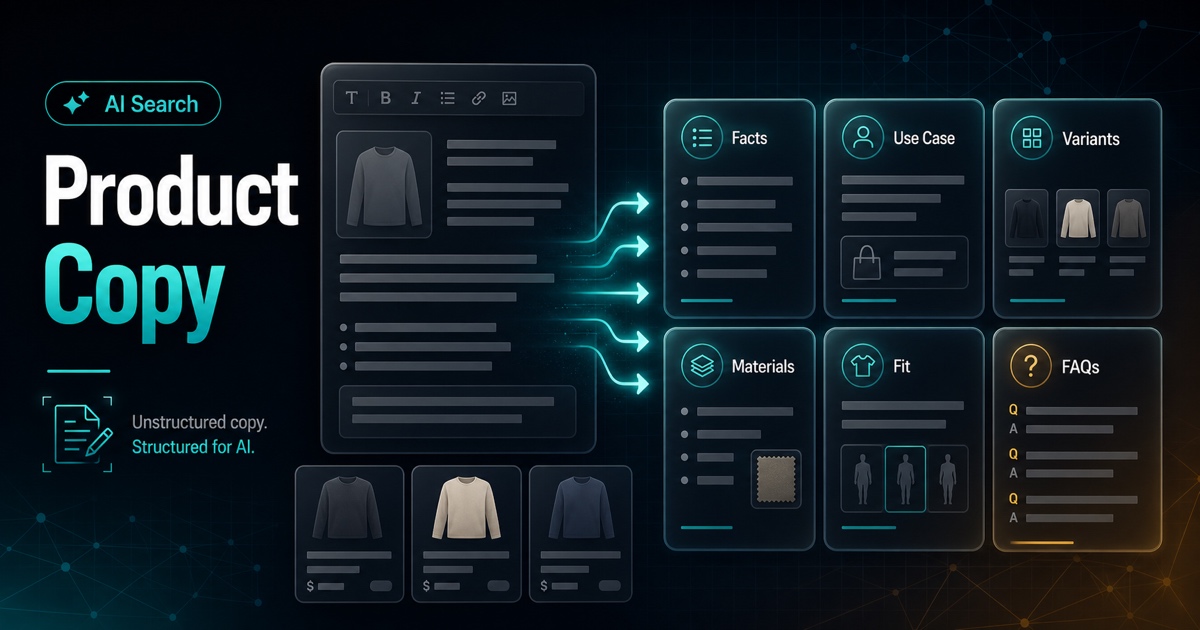
Many Shopify product descriptions are written to sound polished, but not to explain the product. They use phrases like "premium quality," "everyday essential," and "designed for modern life." Those lines may feel safe, but they do not give shoppers or AI systems much to understand.
AI search readiness starts with clear product facts. The page should explain what the item is, who it is for, how it is different, and what someone should know before buying.
The Short Version
A strong product description should answer six questions:
1. What is the product? 2. Who is it for? 3. What problem or use case does it solve? 4. What are the important specs, materials, sizes, or compatibility details? 5. How do variants differ? 6. What questions would a buyer ask before checkout?
If your copy skips those answers, the page is harder to summarize and harder to trust.
A Better Product Description Structure
Use this structure before worrying about clever copy.
| Section | Purpose | Example prompt |
|---|---|---|
| Product identity | State what it is | What would a shopper call this item? |
| Use case | Explain why someone buys it | When and where is it used? |
| Buyer fit | Name the right customer | Who is this best for? |
| Concrete details | Add specs and constraints | What size, material, fit, ingredients, or compatibility facts matter? |
| Variant guidance | Explain choices | How do sizes, colors, bundles, or models differ? |
| FAQ support | Reduce uncertainty | What does support or sales answer repeatedly? |
This structure works because it turns vague marketing into usable context.
Before And After Example
Weak version:
Our Everyday Carry Backpack is made with premium materials and designed for your daily routine. Stylish, versatile, and comfortable for any occasion.Stronger version:
The 22L Commuter Backpack is built for daily work travel, with a padded sleeve for laptops up to 14 inches, a side pocket for a water bottle, and a front organizer for cables, notebooks, and small tech accessories. It is best for office commutes and day trips, not overnight travel.The second version gives concrete facts. It names capacity, use case, laptop fit, storage details, and a limitation. That is more useful for shoppers and easier for search systems to interpret.
Write For Decisions, Not Just Impressions
Product copy should help someone decide. That means including details that separate one product from another.
Good decision details include:
- Best use case.
- Size and fit.
- Materials or ingredients.
- Compatibility.
- Included items.
- Care instructions.
- What it is not ideal for.
That last point is important. Saying what a product is not for can make the page more trustworthy.
Explain Variants Clearly
Variant dropdowns are not enough. If a shopper sees Small, Medium, and Large, they still need to know what changes.
Instead of only listing sizes, add a short variant guide:
Small fits daily essentials and a phone. Medium adds room for a tablet and charger. Large fits a 14-inch laptop and work accessories.For apparel, explain fit. For supplements, explain serving count or flavor. For home goods, explain dimensions and room fit. The exact fields change by category, but the principle stays the same: make the choice understandable.
Add FAQs From Real Buyer Questions
FAQs should not be fake marketing questions. They should answer pre-purchase uncertainty.
Useful FAQ sources include:
- Customer support tickets.
- Live chat questions.
- Reviews.
- Returns reasons.
- Sales objections.
- Product comparison questions.
Strong FAQ examples:
- Will this fit a 14-inch laptop?
- Is this safe for sensitive skin?
- Which size should I choose if I am between sizes?
- What is included in the bundle?
- How should I clean it?
Those questions add context that the main description may not cover.
Keep Schema And Copy Aligned
If your structured data describes the product differently from the visible page, the store sends mixed signals.
Review whether the page and schema agree on:
- Product name.
- Description.
- Brand.
- Images.
- Price.
- Availability.
- Variant or offer details.
The page does not need to repeat schema mechanically, but it should not contradict it.
What To Avoid
Avoid copy that sounds nice but says little:
- "Premium quality."
- "Perfect for every lifestyle."
- "The ultimate solution."
- "Made for everyone."
- "Best in class."
If a sentence could be used for almost any product, rewrite it with specifics.
A Quick Rewrite Checklist
Before publishing a product page, check:
- The first sentence names the product clearly.
- The page explains the main use case.
- Important specs are visible.
- Variants are explained in plain language.
- FAQs answer real purchase questions.
- The page mentions meaningful limitations when relevant.
- Schema and visible copy agree.
- Internal links connect the product to collections or guides.
Where AnswerAtlas Fits
AnswerAtlas audits product pages for the gaps that make catalog content harder to understand. That includes vague descriptions, missing facts, weak FAQs, inconsistent schema, and unclear variants.
If you are rewriting product copy, start with your best sellers or highest-intent pages. Then request a product content gap audit to find the next pages worth fixing.
Next step
See how AI-readable your Shopify catalog is.
AnswerAtlas can scan product pages for AI-readiness signals such as structured data, catalog clarity, and crawler-friendly content.
Open Shopify App Store listing